Friday, November 21, 2008

Monday, July 14, 2008
Version 20080715 is released
Fixed the audio recording problem on audio recording
[Description]
There is no sync code to wait for the convertor finishing its job causing the removing the audio source before/during the converting process. This bug makes the audio recording/converting process in an unstable status. In user level, this makes the audio function fails.
[Fixed code]
=> add the following sync codes to fix this problem.
------- code ----
WaitForSingleObject(pi.hProcess,INFINITE); // wait for lame compete its job. convert wav -> mp3
DeleteFile(FullWordWaveFile); // we had conver the FullWordWaveFile file into mp3 format, so, the *.wav file will be deleted.
-----------------
Thursday, March 27, 2008
[Info] Which audio source can be selected to record the pronunciation audio?
I always choose [Wave Out Mix] to record the pronunciation audio. The detail operation is shown as follows.
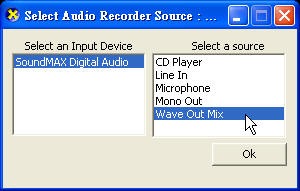
若你的作業系統是中文語系, 可能的選項是「聲波輸出混音器」
by Jing
Ps: 感謝 teaman92 修正內文
Sunday, March 23, 2008
[Fixed] the MS-DOS window which occupies the dictionary content
[add] preventing the command interpreter window occupies the dictionary screen.
[tech] using CreateProcess instead the system function call. The detail is listed as follows.
------------------- code ------------------
PROCESS_INFORMATION pi;
STARTUPINFO si;
memset(&si,0,sizeof(si));
si.cb= sizeof(si);
if(!CreateProcess(ProgramName,RunCommand, NULL, NULL, false, 0, NULL,NULL,&si,&pi)) {
MessageBox(NULL,_T("開啟執行檔發生問題"),_TCreateProcess Error"),MB_OK);
ShowError();
}
----------------------------------------------
by Jing
Friday, March 21, 2008
[Released] Version: 20080322
1. In order to support all mp3 players, the recorded audio format is changed from wave form into mp3 compression format using the lame audio codec.
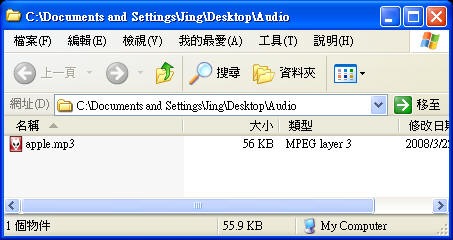
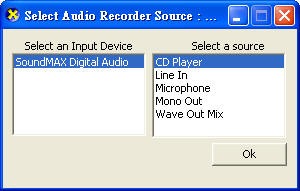
2. An audio source selection function is added to prevent the audio recording failure.
by Jing
Subscribe to:
Comments (Atom)
